Setting up Fedora Linux
f10 to get into bios setup
Turn off secure boot
When you type the 4 numbers to disable secure boot, you MUST use the number keys, not the numpad
Disable fastboot
f9 to get into boot menu
Select usb stick
Install
sudo hostnamectl set-hostname new-hostname
hostnamectl
sudo systemctl reboot -i
# Set up tailscale
sudo dnf config-manager addrepo --from-repofile=https://pkgs.tailscale.com/stable/fedora/tailscale.repo
sudo dnf install tailscale
sudo systemctl enable --now tailscaled
sudo tailscale up
tailscale ip -4
# Install Vim
sudo dnf install vim -y
# Set up SSH
ssh-copy-id oak
sudo vim /etc/ssh/sshd_config
PasswordAuthentication no
PubkeyAuthentication yes
sudo systemctl restart sshd
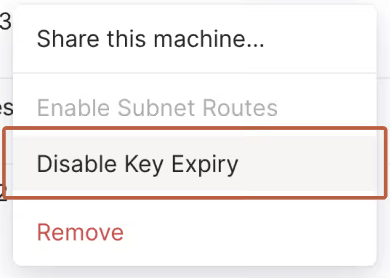
Go to tailscale dashboard and select 'Disable key expiry'
# Set up passwordless sudo
sudo EDITOR=vim visudo
# Scroll to the bottom (or find the `%wheel` section).
mikaelweiss ALL=(ALL) NOPASSWD: ALL
:wq
# Set up Git
sudo dnf install git -y
git config --global user.email "[email protected]"
git config --global user.name "Mikael Weiss"
ssh-keygen
cat .ssh/id_ed25519.pub
# Add ssh key to github
# Clone dotfiles
mkdir code
cd code
git clone [email protected]:MikaelWeiss/dotfiles.git
# Set up NeoVim
sudo dnf install nvim -y
mkdir .config
ln -s /home/mikaelweiss/code/dotfiles/nvim /home/mikaelweiss/.config/nvim
nvim
sudo mkdir /root/.config
sudo ln -s /home/mikaelweiss/code/dotfiles/nvim /root/.config/
# Set up terminal
sudo dnf copr enable atim/lazygit -y
sudo dnf install lazygit -y
sudo dnf install zoxide -y
sudo dnf install zsh -y
sudo chsh $USER -s $(which zsh)
ln -s /home/mikaelweiss/code/dotfiles/.zshrc-linux .zshrc
ln -s /home/mikaelweiss/code/dotfiles/.p10k.zsh-linux .p10k.zsh
sh -c "$(curl -fsSL https://raw.githubusercontent.com/ohmyzsh/ohmyzsh/master/tools/install.sh)"
git clone --depth=1 https://github.com/romkatv/powerlevel10k.git "${ZSH_CUSTOM:-$HOME/.oh-my-zsh/custom}/themes/powerlevel10k"
source .zshrc
Setup in the console
Go to Applications and install Podman and Files
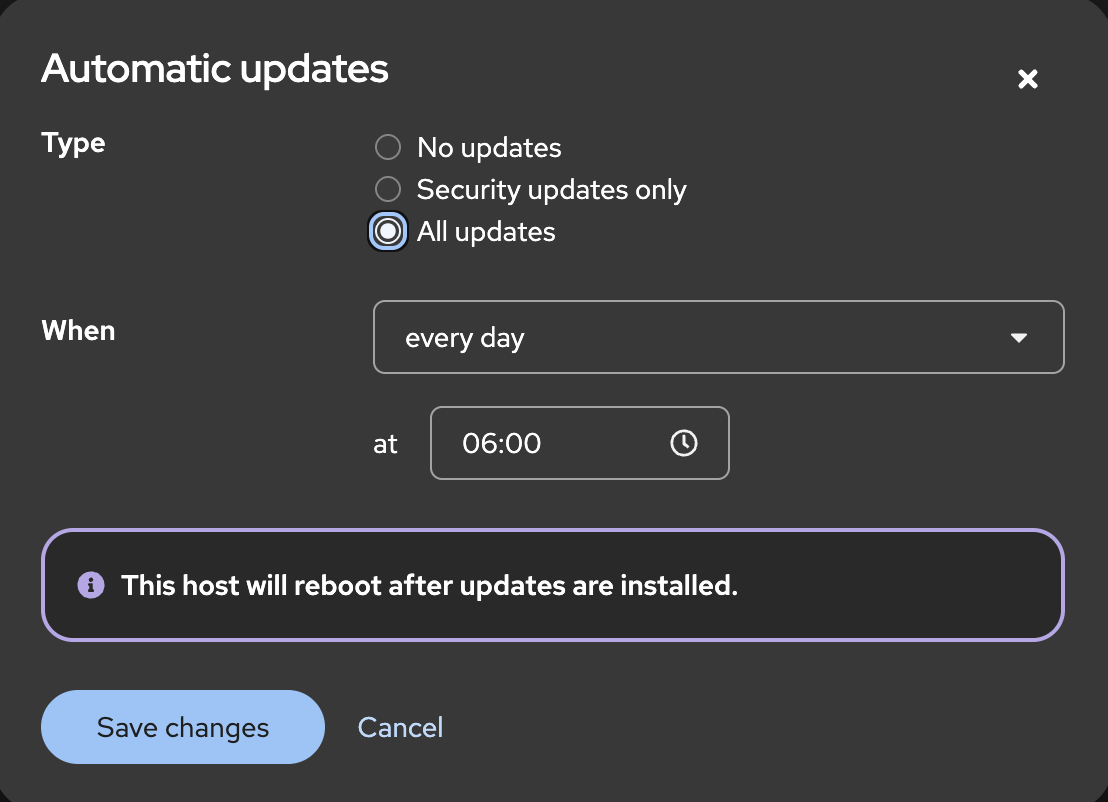
Go to Software updates
Select 'Automatic updates'
# Setting up the file system correctly
sudo lvextend -l +100%FREE /dev/fedora/root
sudo xfs_growfs /
# Other stuff to install
sudo dnf install fzf -y
sudo dnf install btop -y
# Yazi
sudo dnf copr enable lihaohong/yazi -y
sudo dnf install yazi -y
# Phoenix & Elixir
sudo dnf install fedora-repos-rawhide -y
sudo dnf --repo=rawhide install elixir elixir-doc erlang erlang-doc -y
# Restic
sudo dnf install -y restic
# Install PostgreSQL
sudo dnf install postgresql-server postgresql-contrib
sudo postgresql-setup --initdb
sudo systemctl enable --now postgresql
sudo systemctl status postgresql

# Set up the backup drive
sudo mkdir /mnt/backup
lsblk
sudo blkid
sudo nvim /etc/fstab
Add: UUID=xxxx-xxxx /mnt/backup exfat defaults,uid=1000,gid=1000,umask=0022,nofail 0 0
sudo systemctl daemon-reload
sudo mount -fav # Check that everything is okay

# Sync the backup with the right directories
sudo mkdir -p /etc/restic
sudo nvim /etc/restic/password
sudo chown mikaelweiss:mikaelweiss /etc/restic/password
sudo chmod 600 /etc/restic/password
restic -r /mnt/backup/minecraft-backup restore latest --target / --password-file /etc/restic/password
restic -r /mnt/backup/share-backup restore latest --target / --password-file /etc/restic/password
# Started at 5:09